Sony VAIO TZ Series Ultra Portable Laptop
by Sze | Filed under Laptop
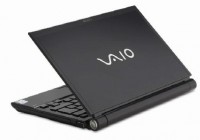
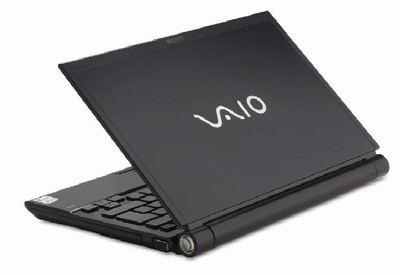
Sony has the new VAIO TZ11 series of ultra-portable notebook PCs. Here are some information about the upcoming Sony VAIO TZ11MN/N and VAIO TZ11XN/B. The VAIO TZ11 series features integrated optical drive, LED backlit display and integrated Motion Eye webcam.
The Sony VAIO VGN-TZ11MN/N is powered by an Intel Core 2 Duo U7500 1.06GHz processor, 1GB of DDR2 RAM, 80GB hard drive, and integrated Intel GMA 950 graphics. VAIO VGN-TZ11MN/N has also a DVD SuperMulti DL burner, a 11.1-inch XBlack LCD display, WiFi 802.11 a/b/g and Bluetooth.
The Sony VAIO VGN-TZ11XN/B is also powered by an Intel Core 2 Duo U7500 1.06GHz processor and it has 2GB RAM, a 100GB hard drive, DVD SuperMulti DL burner, a 11.1-inch XBlack LCD display, WiFi 802.11 a/b/g and Bluetooth.
You may also want to get a VAIO TZ with 32GB solid state drive.
[Notebook Review]
Tags: Laptop, SONY, sony-vaio, Sony-VAIO-TZ, Sony-VAIO-TZ11, sony-VAIO-TZ11XN/B, Ultra-Portable-Laptop, vaio, VAIO-TZ11MN/N, VAIO-TZ11XN/B
Twitter


Does the cam driver in the VGN-TZ3 downgrade package work with TZ11XN?
dear all…
i have problem with my viao VGN-TZ11XN…i need my webcam driver…plz help me…thanks before
hi all…
i have problem with VGN-TZ11XN…i need webcam driver…plz help…
hi
i use sony vaio TZ11MN notebook with vista business preinstalled.
I need to dual boot my original vista with winXP pro
plz help me on how to go about…
[...] a fazer. No evento, foi feito um teste com 37 produtos. Os mais bem classificados foram o notebook Sony Vaio TZ11, o celular Sony Ericsson T650i e o organizador pessoal Sony Ericsson P1i, mesmo assim só com pouco [...]
i have a problem with VGN-TZ11MN…i need my webcam driver
thanks for the help!!
will the full XP drivers you get there work for all vaio models or just the TZ?
Thanks for all suggestion. With the package downloaded, it works well except the speaker. I have been looking for it, but no results. Anyone knows some or shares resources?
Thanks
The Regard! The Excellent forum! Thank you!
http://danuegonax.com
The Author, you – genius…
webcam works for me.
I just followed this:
http://forum.notebookreview.co.....p?t=159585
For me everything works except playing a dvd without booting up. But I never got that feature to work even before I touched anything anyways. One of the sony online updates tried to update it and botched it I think. Something tries, it does light up a screen with some icons, but it’s completely unresponsive to any button presses and just shuts off again in a couple seconds.
Theres a guy on youtube showing that feature working with XP, but there is no clue if maybe the original factory 8G recovery partition was left intact and maybe thats where that feature really “lives”. My 8G recovery partition has an OS installed over it.
please help!
Hi,
I need help with the webcam in XP… Everything is working fine but the webcam. Would like to get this working… anyone know of anywork arounds or ideas?
Performance is much better in XP than Vista!
Hello,
Any news about webcam?
My webcam still not working. There is a driver. But device manager is OK. There no yellow or red status. Only device related for camera = “Usb video device”.
is there any hope?
Thank you.
a very good advise.
thanks. i have d/l and install it already.
: )
ftp://ftp.vaio-link.com/PUB/OS/XPDOWNGRADE/TZ1-TZ2 Enjoy, gentlemen
Make sure you install Sony Library first
Ok,
and now 18.09.2007 with all Utilities. Use the above Product Code and Serial. The link (thanks Sebastian)
http://support.vaio.sony.at/os.....de_AT_cons
Hi,
my Product Code and Serial:
Product Code: 28203751
Serial Number: 5000200
Well, the Serial is faked…
Instructions are in German. But normally you should simply first install the BIOS and afterwards install the Driver/Folders from 1-13. If you need help, post here.
Ciao
Gonzalo
Unfortunately the official downgrade site above does not like my product code or serial number. Understandable since it’s a .at site and I am in the USA. The US sony site says simply that they will not provide nor support anything at all but Vista. Jerks. Just like MS. These companies have the whole customer/vendor relationship backwards.
Unfortunately they will continue to do so, since, I _hate_ vista, hate all windows actually, and _I_ purchaced a TZ. So where is there incentive? They were not penalized at all for making my life difficult. In fact, I am probably better for them than normal users since, as a Linux user I already know I’m on my own wrt drivers and any kind of support. I have already royally screwed up the Vista boot manager (not just the mbr, I mean the BCD thing that replaced NTLDR, what a finicky delicate easily broken piece of JUNK that thing is… yay for BootIT NG with it’s self-booting iso and built in BCD editor that, unlike EasyBCD, doesn’t need a fully functioning installation of Windows in order to fix your boot manager so thatr you can regain access to your fully functioning installation of Windows… What idiot writes a boot manager repair util in .NET ??? Arggg!) Anyways I’ve already scrambled and repaired that a dozen times installing linux and XP and wiping the recovery partition to put XP on etc… So unless there is a real, unavoidable hardware problem, Sony support will never have to do a lick of work for me. They actually get an advantage by screwing me. So… Since Dell is dragging their feet with their supposed Linux experiment, and since the M1330 is too large and heavy and short battery life compared to the TZ anyways…(although.. more than twice as fast with 2×2ghz cpu and 667mhz ram vs 533… and the remote and slot-load drive and wifi detector and hdmi ARE pretty cool…) For these and other reasons things will most likely not be getting better.
Finally it worked with another xp cd.
That’s too bad. I haven’t tried the official route yet but did manage to install XP. Here is what I did:
- create a recovery DVD
- a complete format of the HDD
- clean install of XP and office
- installed all microsoft updates
After that, some drivers were already installed. Then, I used the recovery dvd and ran some of the pograms in the directory VAIO/Applications. Some of these programs work on XP, others may crash so make sure that you use System Restore to roll back to stable versions. Currently, I am still missing some drivers (camera, button controls, battery control) but the system works, is stable, and much faster than with Vista.
Unfortunately the System hangs with a bluescreen of death during the installation of windows xp. Any suggestions?
http://support.vaio.sony.at/os.....de_AT_cons
Not yet. I have requested help from the Sony support center. If anything useful comes up, I will share it.
Regards
Anyone manage to find any handy places for these drivers?
Can someone give me the link too?
Simon
Hi,
I would be very much interested in links to the appropriate XP drivers too!
Regards,
Eric
Hello,
Plz send me address site or link to download drivers for XP.
Thx,
rusiu
Hi, there is no official drivers for windows xp. Yesterday I wrote to sony asking for them and they answered me today saying that for an agreement with Microsoft they can’t offeer drivers for XP. By the way, is too easy to find almost all the drivers. I’m only having an issue with the cam, that doesn’t concern a lot, because I don’t use it.
I recommend you a lot to use XP in this laptop, the performence becomes amazing versus Vista Business.
See you!
I cannot see the site link to the XP drivers for TZ11XN. Someone help please.
I have the same laptop and I cant find any xp drivers either – any ideas?
Hi,
very nice laptop, however I cannot find any drivers for Windows XP. There is preintalled Vista Business which has got some issues with our company soft.