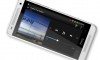

CECT P168 - iPhone Clone
by Sze | Filed under Mobile Phone, Smartphone.
You probably have heard of the Meizu MiniOne, which is an Apple iPhone clone (though the specification is better). Here is another iPhone clone from China, the CECT P168.
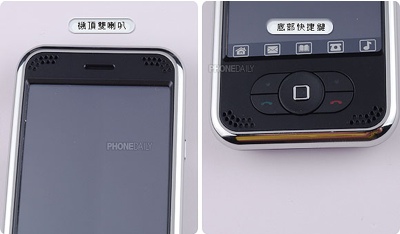
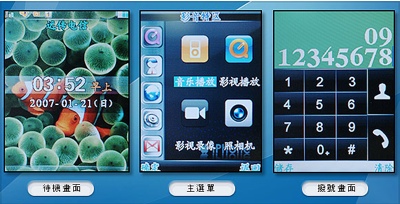
The CECT P168 looks really like the iPhone, even the wallpaper has been copied. The CECT P168 has a 3.5-inch QVGA LCD touchscreen, a 2 Megapixel camera (actual resolution: 1.3 Megapixel). It has integrated music player, video player, dictionary.
The CECT P168 has two SIM card slot, unfortunately you can’t use the two SIMs at the same time but have to switch between them.


[PhoneDaily]
Tags: Apple, apple-iphone, CECT, CECT-P168, iPhone, iPhone-Clone, Mobile Phone, p168, Smartphone

November 18th, 2008 at 4:34 pm
Maybe A8+ is better than this p168, we can make multi language. site: http://www.gadgetscn.com
November 18th, 2008 at 12:17 pm
send me password of 6900 (pocket pc)
November 17th, 2008 at 7:24 am
I want to ask if any of you find a way or a software to add notepdding software or any other software to add notes to the ifone 168C, regarding the Internet & MMS setting jus ask your provider to send you the NOKIA 2610 auto settings and they will work just great, I did it and have both working great.
be well and safe all
November 16th, 2008 at 8:40 am
My p168 is muted I can hear but the person on the other end cant hear me. How do I fix this?
November 14th, 2008 at 1:07 pm
I a able tog et the screen replaced on most of these phones. Send me an email at sales@zydaglo.com and I can see what I can do for you. I have to admit that the newer phones have better screens than the older ones. The i68+ and the X1 have good screens along with the p168C.
November 14th, 2008 at 1:00 pm
this phone is flimsy, the screen cracked and I cannot get it replaced because it is a knock off, which I didn’t know. now it is useless
November 13th, 2008 at 3:49 pm
I have a cect p168 that the screen is too sensitive and it dials by itself. is there a way to lock the screen beside lock slide?
please advise me.
November 11th, 2008 at 2:26 pm
IF YOU ARE HAVING TROUBLE I STRONGLY ADVISE YOU TO GO TO YOUTUBE.COM, I DID IT AND NOW MY PHONE WORKS FINE
November 11th, 2008 at 12:18 am
Annoying problem.
My cect p168 keeps on beeping, warning for a “bad charger” or “in charge” or “charger disconnected” even thou nothing at all is connected at it.
Opened it to see if it was a bad contact behind the charge connector but found nothing wrong there.
Any idea?
November 10th, 2008 at 11:40 pm
are you still using this cellphone? it is out of fashione. It is Miphone hot now. just check this website for your iphone copy this year: http://www.dragonkicks.com and http://www.eleczilla.com
November 10th, 2008 at 3:18 pm
I have a major sale going on at http://www.zydaglo.com for the new CECT X1, which has the features of the P168+ with a new look. I also have the P168C latest version, the CECT WIFI with windows and the M88 Windows wifi quadband along with the Sciphone i68+. The sale will go on through the weekend. Get $10 off by mentioning this site! email me at sales@zydaglo.com
November 10th, 2008 at 2:56 pm
Is there anyway to remove some of the 25 annoying system ringtones so that I can add more than five personalized ringtones. Also my camera now freezes….the display shutter wont open….any suggestions
November 10th, 2008 at 11:54 am
Here is a really easy way to set up internet access on the P168 for any carrier that offers it world wide.
1. Go to Nokia site via this link http://www.nokiausa.com/A4410019
2. Find Step 1: Get standard settings and click the Get Standard Settings link.
3. Accept the terms
4. Select telephone model 2610
5. Click Next
6. Select WAP/GPRS
7. Choose your Country
8. Click Next
9. If your country has more than one carrier, Choose your carrier (other wise go to step 11)
10. Click Next
11. Enter the Security code shown
12. Enter the telephone number of your A380i
13. Click Order Settings
14. Save the PIN Code at the top of the page
15. When SMS arrives Click install
16. Enter the PIN when requested
or you can do it this way
This is the $5.99 TMobile Web plan set up:
Create Data Account
1. Select Menu
2. Select Entertainment
3. Select Services
4. Select Data Account
5. Select GPRS
6. Choose an empty profile
7. Account Name enter T-Mobile WAP
8. Press Options
9. Press Done
10. APN enter wap.voicestream.com
11. Press Options
12. Press Done
13. User Name >Leave BlankLeave BlankLeave BlankLeave Blankclick Server Profile
2-Click on any 1–> click on Edit Profile
1- Rename profile
T-mobile MMS
2- Homepage
http://216.155.174.84/servlets/mms
3-Data Account
click on GPRS–> choose Tmobile–> press OK
4- Connection Type
HTTP : 216.155.165.050 - > port 8080
5- Username
leave it blank
6 Password
leave it blank
CLICK ON DONE –> SAVE–>ACTIVATE PROFILE
VOICEMAIL:-
November 10th, 2008 at 10:57 am
How do i setup the internet on my P168+ for AT&T. When i go to WAP and type in an adress ir says GPRS not subscribed but i have unlimited internet on my contract.
November 9th, 2008 at 6:56 pm
The p168 is a piece of crap the tmobile settings dont work anybody have settings 4 tmobile that actually work
November 7th, 2008 at 5:50 pm
The phone is flimsy and is a piece of sh**. I had it for a couple of months and it died on me. Just didn’t work anymore
November 6th, 2008 at 9:40 am
Poroto
About the internet mine is the same way but that’s because I don’t have internet service on my t-mobile account. I know it only cost $5.99 but I never had the need to have internet on my phone. Maybe some day I will put it on just to try it.
November 5th, 2008 at 7:46 pm
hi Poroto:
to view your ring tone you must go to profile and pick general there you pick customize then tone set up there you will see about 25 ringtones you can also add 5 custom ringtones just pick one of the empty spots it will direct you to your file on a memory card and there you can see your music.
any questions let me know.
November 5th, 2008 at 5:44 pm
celi
do you know where i go to view my ringtones replace and view thank you in advance
November 5th, 2008 at 5:41 pm
hello celi
yes picture is wking but not internet i can’t view it i most of done something wrong
November 5th, 2008 at 5:52 am
I just got this phone and I can’t recieve picture msgs…I have at&t….also I need it to be on SILENT not just vibrate and I can’t figure it out haha