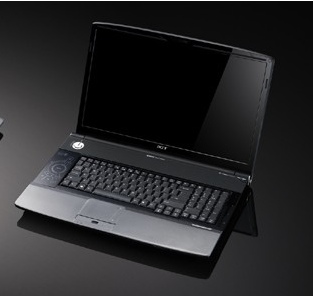
Acer Aspire 8920 and 6920 GemStone Blue Notebooks
by Sze | Filed under Laptop. 
Acer releases in the US market the Gemsonte Blue Aspire 8920 and Aspire 6920, which are the market’s first notebook PCs to have18.4-inch and 16-inch display.
The 18.4-inch Aspire 8920 will be powered by an Intel Core 2 Duo T9500 processor, NVIDIA GeForce 9650M GS or NVIDIA GeForce 9500M GS graphic card, up to 320GB hard drive. Other features:
- Mobile Intel® PM965 Express chipset
- Integrated Blu-ray Disc drive or 8X DVD Super Multi double-layer drive
- 18.4-inch Full HD 1920 x 1080 resolution Acer CineCrystal display
- Discrete NVIDIA® GeForce® 9650M GS or NVIDIA GeForce 9500M GS
- 6-in-1 card reader
- Express Cardâ„¢/54 slot, HDMI port with HDCP support
- 802.11a/g/n WLAN, Bluetooth®, gigabit LAN, V.92 modem, integrated webcam
The 16-inch Aspire 6920 has similar features as the Aspire 8920 but with a 16-inch display instead.
Tags: 6920, 8920, Acer, acer 8920, Acer Aspire 6920, Acer Aspire 8920, Acer-Aspire, Acer-Gemstone, apire, GemStone Blue

June 29th, 2008 at 12:08 pm
FALSE ADVERTISING!!! I bought this unit ($1,500) based on the Acer website specs for the unit which includes, among other things, Bluetooth. Guess what? The website lied, there is no Bluetooth. I called and wrote Acer and all I got back was “we apologize for the inconvenience but we are not responsible for the information on our website” - ???!!!??
Are you kidding me? If we can’t use the manufacturers own website to get accurate information about their products, where can we go? Bluetooth was a major reason I bought the unit. As I write this - one month after initially talking to Acer - the false information remains on their website!! Avoid Acer, they have ZERO customer accountability and now I’m stuck with this thing.
August 10th, 2008 at 2:51 pm
As a response to the above comment, I am currently using the Acer aspire 6920, with no problems what so ever, granted, the bluetooth is a little awkward to use, however, my one certainly has it.
I believe that there are quite a few different models of the 6920, with varying specs, including processor, graphics card, wireless (draft-n yes/no) and blue tooth, and the same with the 8 series.
Have to admit though, not liking vista much.. prefer ubuntu…
At any rate, it is much better than my old Sony Vaio… that piece of s*** (pardon my language, I do hate to curse, however, this demonstrates my strength of feeling) was not worth the price in pence, yet alone pounds.
August 14th, 2008 at 10:58 am
Im sitting here with my brand new Aspire 6920 which I got delivered today. I can’t get the bluetooth starting… grrr.. Maybe Jaffa can tell us how to use it…please?
August 21st, 2008 at 8:02 am
well, i second henrik on that.. i ve spent the last 2 hrs checking out my aspire 6920g… and the bluetooth is defn8ly not working.. jaffa.. please provide info on how u got ur bluetooth working..
August 29th, 2008 at 4:01 am
Re: 6920g bluetooth
Push vertical button extreme bottom right hand side.
Bluetooth icon appeared on right hand side of task bar. Double clicked icon to set bluetooth options.
Cheers.
November 6th, 2008 at 8:02 am
I found the button. It had a little blutooth logo above it. I push it and “not installed” pops up on the screen. Jerks.
November 9th, 2008 at 6:28 am
i got this in october and its november and iam still trying to find the dam bluetooth. i did every thing on the web that they said to do but nothing. the only thing i get is (no bluetooth device). missleading the costomer is a serious ceime where i live i hope i dont have to report it