
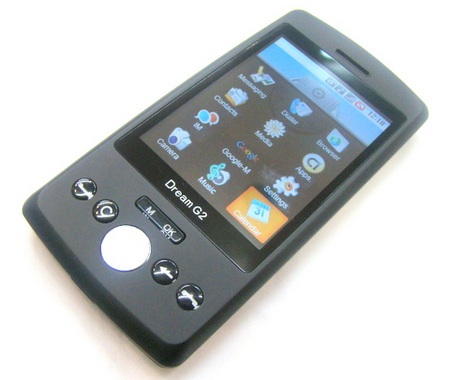
Remember Sciphone’s Dream G2 Android phone? The Chinese cellphone maker has released the Dream G2+ with WiFi added. The G2+ features a 2.8-inch 320×240 touchscreen, a 4 Megapixel camera, tri-band GMS support and of course the newly added WiFi connectivity. It supports SD card.


Its a junk phone, mine worked for two weeks…waste of money.
it really sucks……….?
when we r in a call after few secends it shows NETWORK FAIL
plz tell me how can i talk for long
i’m using dream G2
i brought this phone and i can not understand anything first my camara does not work i tryed everthing and it will not work maybe someone can help me
how to hard reset dream g2,
my touchscreen not work… any one help me?? Please…
i jst recive mine G2, well everything works. wifi,touch screen mostly everyting.. can anybody tell me if this phone can play youtube videos cuz mine can’t.
Had one of these phones dont buy one they are a complete waste of money. The only thing they are good for is the trash can.
has anyone else had a problem getting the G2 phone to detect the sim card? I put it in, it worked, I took it out to copy numbers from my old phone, and when i put it back in it wont detect the Sim card. Any suggestions?
look very closely when inserting the card. It can be placed outside the slot very easily. Doesnt matter too much though, because the phones are junk.
Dont know about THAT, I got one for my son for xmas and he is loving it. Works perfect for someone that doesn’t want to be bound to some facist “data plan” or have to be bound to a new 2 year contract if you don’t want to pay $500 for a phone.
For anyone considering buying this phone. DO NOT.. unless you like wasting your money because that’s the end result. Its just plain junk. difficult to use and had to be constantly callibrated. It a chore just to dial a number. If you want to waste your money, ill gladly spend it in the U.S. And keep it out of the chinese hands that make this bogus junk.
Maybe these are answers to some of the questions people encountered (I’m not sure my answers are right): 1. Use the attached stylus, it is not very sensitive without it for small prints. 2. The download site is at http://www.mysciphone.com, press “more” on download menu. 3. If you received an “unable to connect” message even with a valid wifi connection, make sure you have set your “date and time” first, otherwise it considers you have an invalid certificate. Follow the downloaded “wifi” PDF file to connect your wifi, it does have an English version on the second page. 4. I totally agree the downloaded manual sucks, it is very out of date.
5. I still do not have my camera working.