
Home   Archives   Deals   Contact   iPhone Clone   CES 2012

NEC LaVie Light BL300-Series Netbooks

by Sze | Filed under Laptop

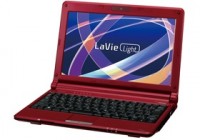
NEC LaVie Light BL300-Series Netbook

NEC announced in Japan its new LaVie Light BL300 series netbook, including the BL350, BL310 and BL300 models. All of them sport Intel’s Atom N280 1.66GHz processor, 1GB RAM, a 10.1-inch 1024×600 LCD dsplay, WiFi 802.11b/g/n and Bluetooth connectivity.

The BL350 include either 16GB SSD and 160GB hard drive and a bigger battery offering 7.4 hours of use while the BL310 and BL300 comes with 160GB hard drive and provides 4.2 hours of operation time. The BL350 weighs 1.32kg and BL310/BL300 weigh 1.14kg.

There is also the LaVie Light BL100 netbook that has an Atom N270, 1GB RAM, 16GB SDD, and a 10.1-inch 1024×576 display. It supports WiFi and offers 3.2 hours of battery life. It weighs 1.07kg.

All the above models run Windows XP Home SP3. The BL310 model will include also Microsoft Office 2007. They will be released on 4 June.
[nec]

Tags: Atom netbook, Lavie, LaVie Light, Mini Laptop, nec, NEC LaVie Light, NEC netbook, NEC-Lavie, Netbook,

| RSS RSS feed | Email Newsletter Email Newsletter

Related Posts

6 Responses to “NEC LaVie Light BL300-Series Netbooks”

  1. Tim says:

    Goto http://www.froggie.sk and use vistalizator. It was originally for Vista but it works with Win 7 too. Make sure you read all the directions carefully. The first time I used it I made a mistake and had some errors. But it’s still pretty easy to use. Currently I have a BL330/VA with Win 7 Starter edition that I got from Docomo here in Japan. I’ve been using Vistalizator on it since I got it back in February or so. Haven’t had any problems like I did on my laptop. As I said I made a mistake because I didn’t take the time to read the directions. Hope this helps. Good luck.

  2. John says:

    Help!!! I have a NEC Model BL300/T that I received from my GF but the OS is in Japanese. Anyone know how to change it to English???

    • Fhel says:

      Me, I Know How To Turn Jap Version To English.

      • Nur Nawang says:

        You can reformat your PC. It is the last resort, I have a problem like yours. I tried all the option like changing language in control panel using regional language, But it doesn’t change language at all.

        • dondonbautista says:

          actually i have the same problem the only way u can change it to english is by reformating it… no other ways……

Leave a Reply