
Home   Archives   Deals   Contact   iPhone Clone   CES 2012

Logitech USB Unifying Receiver

by Sze | Filed under Peripherals and Accessories

Logitech USB Unifying Receiver

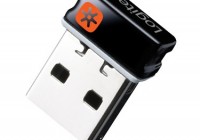
Logitech introduces the USB Unifying Receiver, a tiny wireless receiver that can connect multiple mice and keyboards to you PC. It connects to up to six Unifying-compatible Logitech mice and keyboards.

The Unifying Receiver uses 2.4GHz wireless technology and supports 128-bit AES data encryption for keyboards. It will be bundled with Logitech’s new keyboards or mice.


[logitech]

Tags: Logitech, Logitech Unifying,

| RSS RSS feed | Email Newsletter Email Newsletter

Related Posts

5 Responses to “Logitech USB Unifying Receiver”

  1. Hal says:

    This thing rocks, so tiny too. Mine came with a Logitech M505 mouse that sports a laser optic which makes this thing work on ANY surface and it’s very smooth/accurate…great for using in the bed or on a car seat…this is one of the best mice I’ve ever used. Unifying is a really cool idea and great for logitech fanboys such as myself. What would be even cooler is if they made a speaker bar for laptops that works with Unifying too. IMHO that should be their next step with this technology, I’m sure it’s possible?

  2. [...] advanced optical tracking technology and uses 2.4GHz wireless technology and comes with the Logitech Unifying nano receiver. It will be released in [...]

  3. [...] with a comfortable, contoured design with soft rubber side grips. The MK520 combo comes with the tiny Unifying receiver for 2.4GHz wireless [...]

  4. [...] Logitech launches the Wireless Desktop MK710 keyboard+mouse combo, which is the follow-up to the MK700. The combo utilizes the 2.4 GHz wireless technology and comes with the tiny USB Unifying receiver. [...]

  5. [...] Logitech rolls out in Australia the Performance Mouse M950 and Anywhere Mouse M905, both equipped with the company’s Darkfield Laser Tracking. These ergonomic mice feature “Hyper-Fast” scrolling and come with Logitech Unifying receiver. [...]

Leave a Reply